Blocking Supplier Price Drug Updates
When you customize a product’s supplier price, the Block $ Updates flag can be turned ON to prevent PharmaClik Rx Updates from changing the price. There are two preferences for blocking supplier price updates. One exists in the Supplier Folder and controls whether supplier prices are updated when purchase orders are reconciled. The second exists in the Drug Folder and controls whether supplier prices are updated for the specific drug pack size, either by purchase order reconciliation or PharmaClik Rx price updates.
Note: In Ontario, a third preference exists in the McKesson Supplier Folder for blocking supplier price updates. When this preference is selected, it is not necessary to use the Block $ Updates flag in the Drug Folder. For more information, see Blocking McKesson Ontario Supplier Price Updates.
When PharmaClik Rx price updates download future price updates to the product, you will be able to review the new price in Review Overrides and choose whether or not it should be applied.
To set the Supplier Price Update Rules from the Supplier Folder:
-
Open the Supplier Folder.
-
Select the Preferences tab.
-
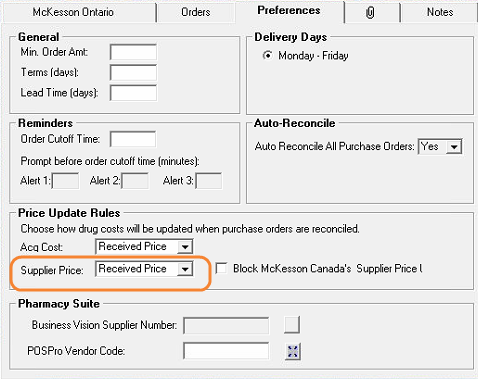
In the Price Update Rules section, select one of the following:
-
Do Not Update - supplier prices are not updated automatically during purchase order reconciliation. They can still be updated automatically by PharmaClik Rx price updates if Block $ Updates is OFF in the Drug Folder.
-
Received Price - supplier prices are updated automatically with the received prices from reconciled purchase orders.
-
Retail Price - supplier prices are updated automatically with the retail prices from reconciled purchase orders.
-
-
Select Save.
To turn the Block $ Updates flag on or off from the Drug Folder:
- Open the Drug Folder.
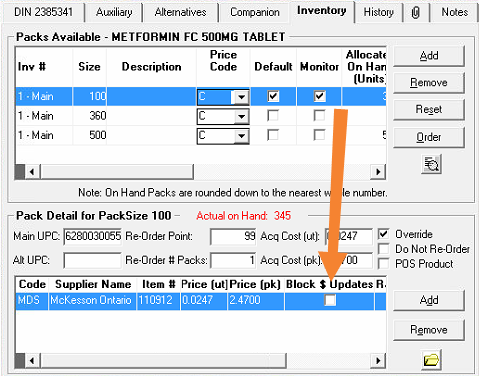
- Select the Inventory tab.
- In the Packs Available, highlight the pack size to be modified.
- If necessary, make changes to the Price (ut) or Price (pk) at the bottom of the tab.
- Do one of the following:
- If you wish to block supplier price updates for the pack size, select the Block $ Updates checkbox. Your store will be responsible for keeping the supplier price up to date.
- *RECOMMENDED* If you wish to receive supplier price updates for the pack size, deselect the Block $ Updates checkbox. Please note, this does not override McKesson Ontario price updates that are blocked at the supplier level.
-
Repeat steps 3 - 5 for any additional pack sizes if needed.
- Press the Save or OK button (the action button differs depending on how you accessed the Drug Folder).